Changelog
All the latest updates, improvements and fixes to Ultramock.
Animated backgrounds
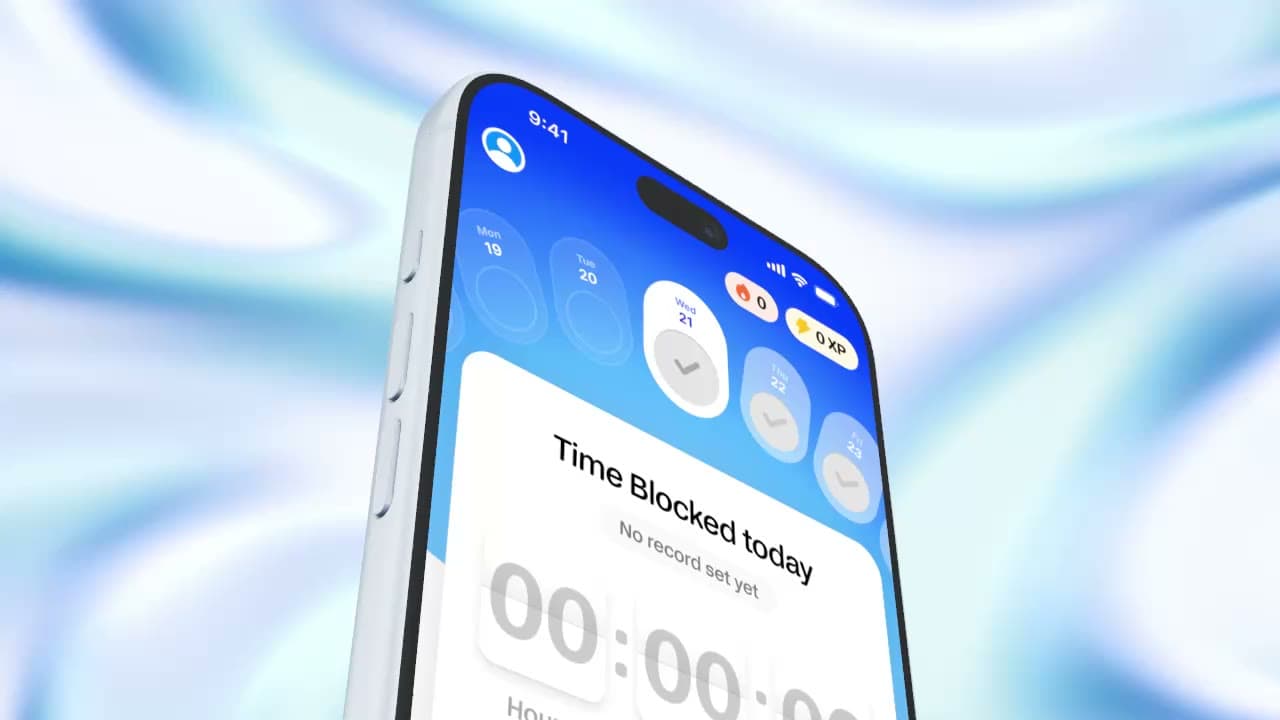
Background has a new Animated mode (Pro): a moving backdrop that plays with the timeline, in the editor and in video exports. Pick Animated under Background and choose from 13 styles, each in a light and a dark version.
Every scene keeps its own style, Color, Speed and Intensity, so a project can move from one look to the next. A moving background on its own is enough to export a video, even behind a still screenshot.
- Background has a Gradient mode: linear or radial, up to four colour stops, with handles you can drag on the canvas.
- 3D devices pick up the colours of the background behind them along their edges.
- Text cards can use Gradient and Animated backgrounds. New text cards match the background of the scene before them until you turn off Match previous scene.
- Lens blur now softens the background as well as the device.
- Preset backgrounds are no longer offered for new picks. Scenes that already use one keep it.
Fixes
- 💾 The editor now reconnects after temporary browser storage interruptions.
- 🖼️ GIF, SVG and AVIF images now save as PNG, and interrupted image uploads retry automatically.
- 🛠️ Fixed a graphics error when leaving the editor while a model is preparing.
Smoother text animations
Fixes
- Fixed the last letters of long text popping in at the end of an enter or cutting off at the end of an exit.
- Exits now ease out of rest instead of jolting, and Words In and Knock glide on long lines instead of blinking.
- Fixed text jumping up or down when an animation finishes, and long word-cycle lines no longer overflow the frame.
- Fixed text behind a device briefly disappearing or shifting when playback reaches the device scene.
- Exported videos now match the preview for Scale, Blur Scale, Knock and wrapped text.
- Captions over a playing video stay in sync and no longer jump when you pause.
- Blur effects keep their blur with Performance playback on.
- Bloom in Effects has a Brightness / Color switch. Brightness gives white text and bright highlights a smooth glow; Color glows saturated UI the way Bloom always has. New projects start on Brightness, existing projects keep Color, and Strength now goes up to 5.
Fixes
- ✨ Fixed noisy shading on the Studio Display bezel in the editor and exports.
Flare
A new Flare effect in the Effects panel makes the brightest light on a 3D device glow, like a lens catching the polished edge of an iPhone or MacBook. It adapts to each device and finish, so silver and black devices glow alike, and your screen content never glows. One slider sets the strength.
Fixes
- 📱 Fixed lavender tint remaining on the iPhone 17 microphone tube and camera surround when changing finishes.
Improved device quality
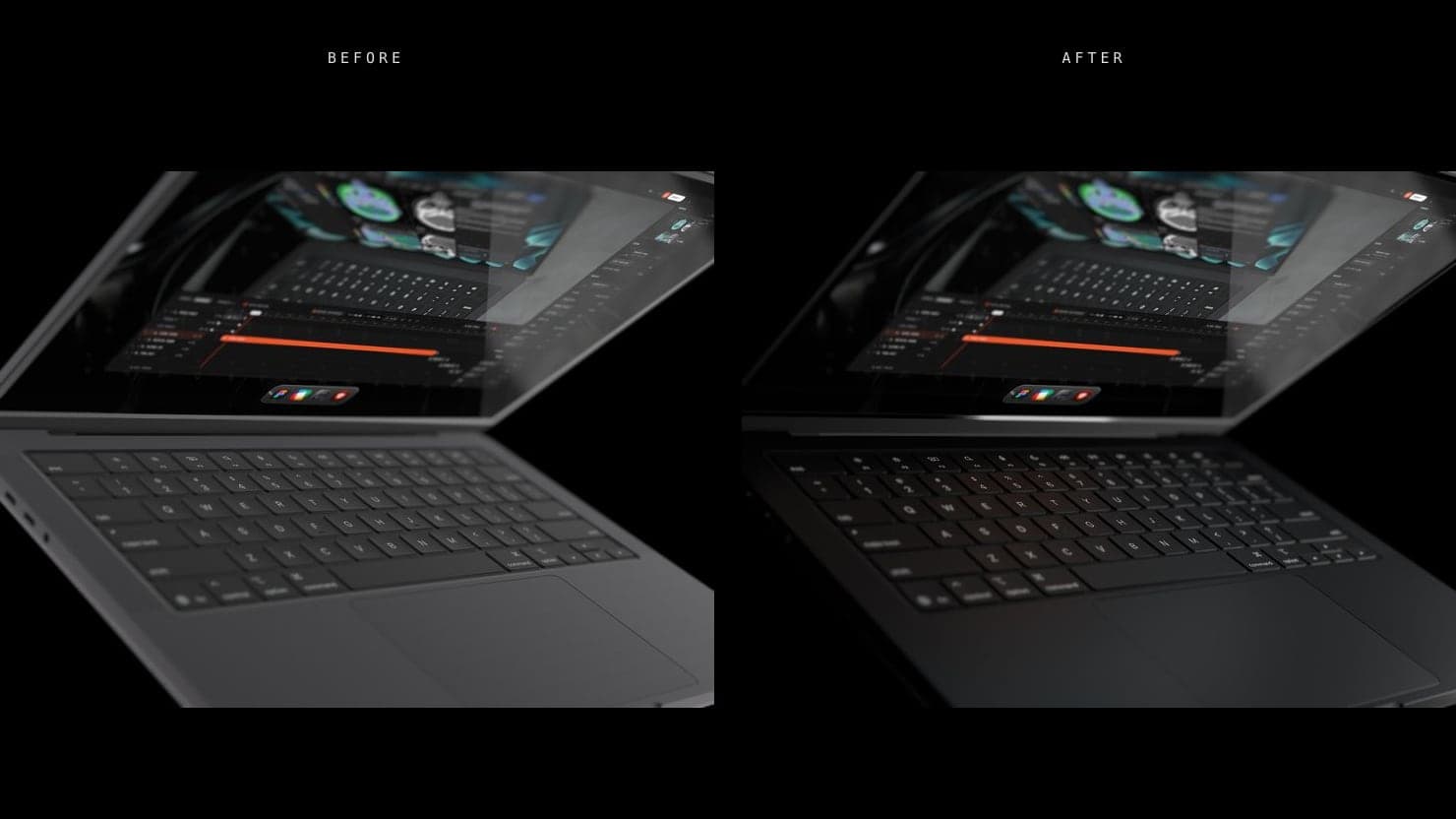
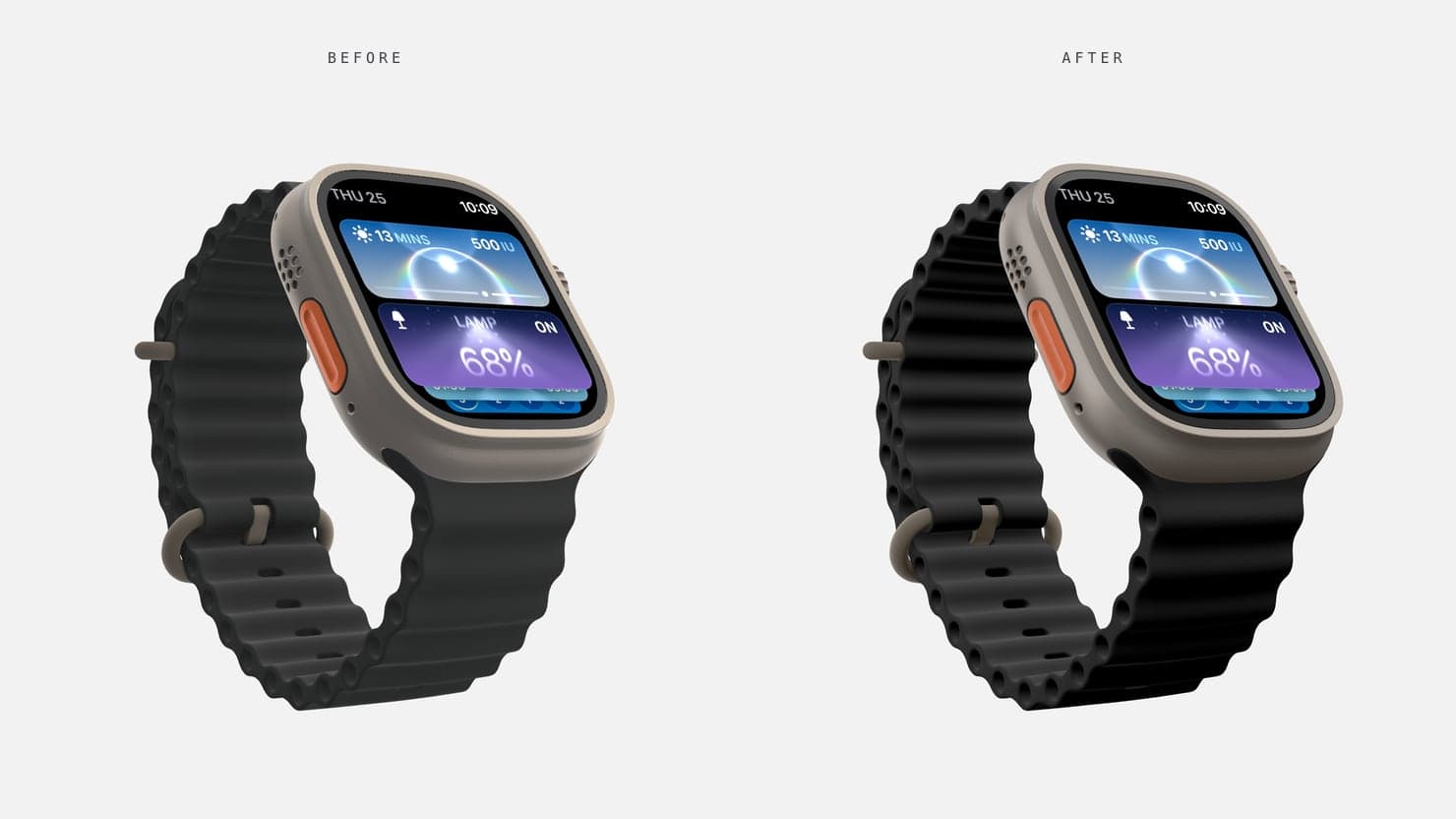
Every device in the Mockup picker has been rebuilt for higher quality, with improved lighting and more realistic shadows in a real studio-style setup. Devices look right on both light and dark backgrounds, and existing projects use the new devices automatically when you open them.
- New device rotation controls: Hold Option/Alt and then click and drag around on the viewport to rotate your mockup for more dynamic angles and shots.
- New iPhone Air, in Light Gold, Sky Blue, Cloud White and Space Black.
- The Dark Room scene has been removed, as its style can now be achieved using the new Light Brightness scene setting. Use the Dark Room MacBook template to start from it.
- Dark grid desk has been improved and now supports every device.
- New Mirror effect, switched on from the scene settings.
- New and improved contact shadows.
- A new device picker, with devices grouped into Phones, Tablets, Laptops, Watches and Displays.
- A new background colour picker, with hex, RGB and HSL entry and an eyedropper.
Fixes
- 📱 Fixed screen content showing through the edge of iPhone models when viewed from behind.
- 🎯 Fixed orange Lens Blur focus lines appearing when a project loads or the timeline moves between shots.
Menu bar, Browser and Dock options
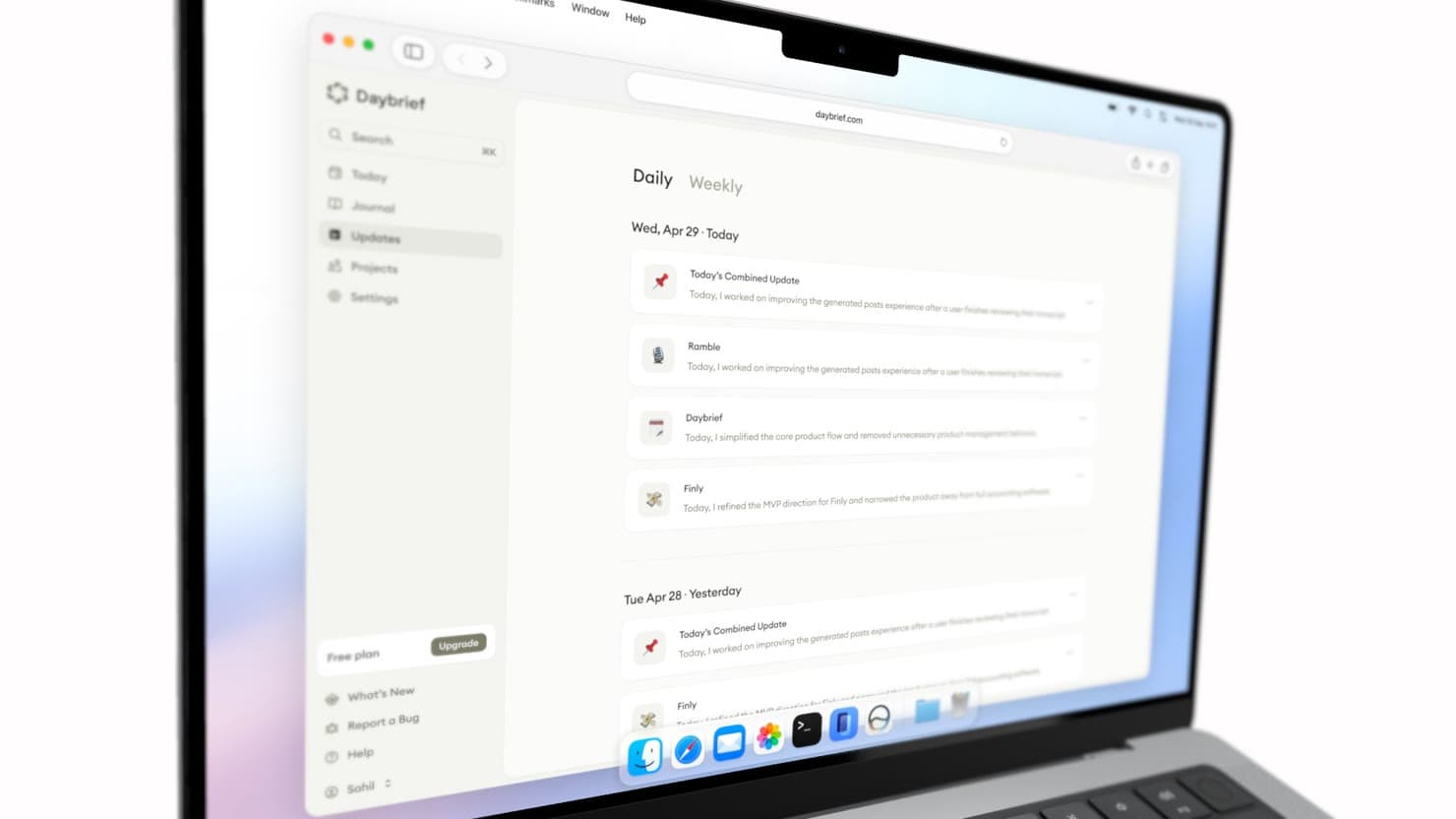
MacBook mockups now come with the option to enable a menu bar, dock and browser window to make the mockup feel even more realistic.
- Type the address shown in the browser frame, under Browser Frame in the Device Screen UI menu.
- Website captures from the Chrome extension open in the browser frame with the site address filled in.
- Screen Padding is now Media Size, shown as how much of the screen the media fills.
Auto motion markers
Each focus area now leaves a numbered marker on the timeline ruler at the moment the camera arrives on it. Drag a marker to change that moment, or click it to jump the playhead there.
Tighter letter spacing for new text
New text scenes and text layers now start at -3 letter spacing, which sets headlines a little tighter. Text in your existing projects keeps the spacing it already had, and the Spacing slider in the text settings still goes from -5 to 20.
Better Safari support
Safari and iOS got a full pass across the editor, exports and the site. Video exports on Safari start without the long pause they used to have, iPhone screen recordings recover from a decoder failure instead of failing the export, and the editor no longer locks you out after Safari resets the graphics context in a background tab.
Most of these apply to every browser built on WebKit, so Chrome, Firefox and in-app browsers on iPhone and iPad benefit too.
- Video export on Safari begins encoding straight away. It previously waited about 15 seconds before recovering on every export.
- Exporting an iPhone HEVC screen recording on Safari now completes through the fallback path instead of failing after a decoder error.
- A free export is no longer used up when the browser cannot run video export at all.
- Exporting in the Image tab as WEBP on Safari now saves a real PNG with the right extension, and the WEBP option shows that Safari cannot produce it.
- Background blur, text backdrop blur and logo blur now render in Safari builds that ignore canvas filters.
- If Safari drops the graphics context while the tab is in the background, the editor explains what happened and offers a reload, instead of saying WebGL is unavailable on the device.
- Opening the paywall or scrubbing through logo scenes on Safari no longer accumulates graphics contexts that could push the editor into that error.
- Pinch to zoom on a Mac trackpad works in the viewport and the timeline in Safari.
- Pages, modals and the account area fit the visible screen on iPhone, so nothing sits under the Safari toolbar.
- Timeline audio resumes after a phone call, Siri or an app switch, and plays with the iPhone silent switch on.
- Image and video downloads on iPhone and iPad succeed after the download confirmation sheet.
- Export messages on iPhone and iPad no longer suggest browsers that cannot do the export, and Safari users are no longer sent to Firefox.
- Recent edits are backed up when you switch apps or close a tab on iOS.
- Holding Space to pan no longer sticks after switching apps with Cmd+Tab.
New 3D scenes: Concrete Desk & Dark Macbook Grid
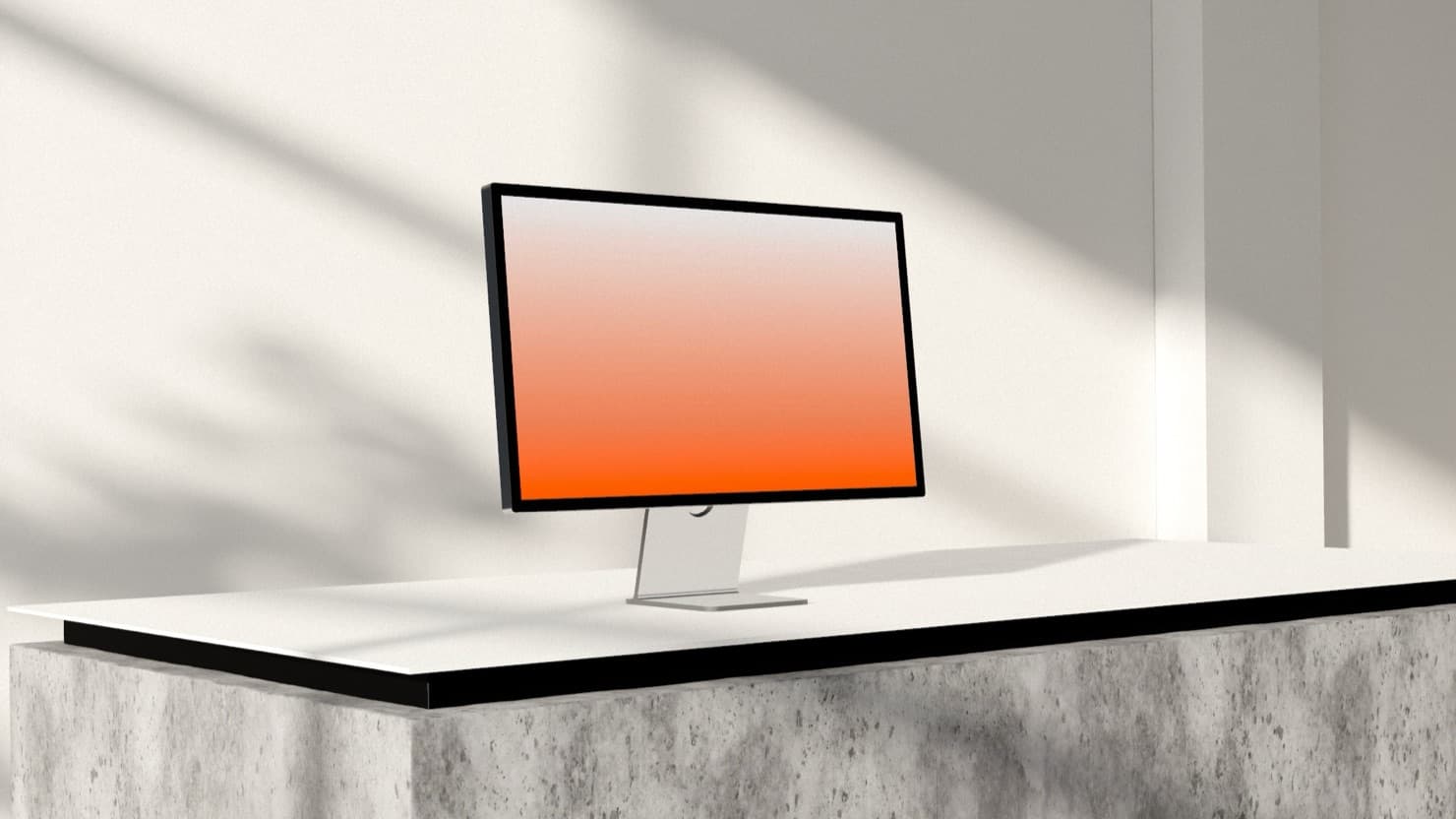
Concrete desk is a new 3D scene: a Studio Display on a white desk over a concrete plinth, in a room lit by soft daylight or, with one switch, at night. It sits in the Scene picker next to Concrete and Bright studio.
The display takes your screen content with the usual screen background, padding and Screen Tilt controls, and you can add a keyboard and mouse to the desk from the Scene settings. Camera moves stay inside the room, so every angle you can reach is one the set was built for.
Studio Display also joins the mockup picker on its own, alongside XDR Display, and both now have a Screen Tilt slider.
- Dark grid macbook is a new 3D scene: a space black MacBook Pro on machined metal, with the standard MacBook screen background, padding and lid controls.
- Scene loading shows real download progress with size and time remaining, and scenes you have opened before load noticeably faster on your next visit.
- The default screen placeholder has new high-resolution artwork, and the Studio scene is now called Bright studio.
- Four new Pro background images in the Scene section's BG Image picker: Elysium, a classical terrace over a Mediterranean bay, Riviera, the same coastline from a wildflower hillside, Obsidian, a near-black mountain valley, and Alcove, a sunlit villa interior.
- Explore the new Ultramock website.
- Every mockup scene now keeps its own device, camera, blur, Studio lighting, theme, background, screen background and effects.
- Select multiple mockup scenes in the timeline and edit them together from the sidebar. Shift-click selects a range, while Cmd/Ctrl-click toggles individual scenes.
- Fine-tune each scene with new Post Processing controls for Exposure, Brightness, Shadows, Midtones, Highlights and Saturation.
- Animate text with Word Cycle, Words In Left/Right and Knock Left/Right.
- Crop video non-destructively from the Source section in the sidebar.
- Use Optimized playback to lower viewport quality during playback for smoother performance in complex projects, without affecting captures or exports.
- Projects now support up to 60 timeline scenes, up from 20, and up to 20 video sources, up from 6.
- Audio clips show a waveform preview in the timeline.
- Undo and redo show a notification describing what changed.
Fixes
- 🎬 Fixed old or unrelated media appearing when selecting overlapping text or scrubbing between shots.
- 📍 Moving the mockup now keeps unkeyed pan values when you scrub the timeline, preserving the existing animation.
New iPhone models

Features
- 📱 New 3D models! iPhone Duo, iPhone 18 Pro and iPhone 18 Pro Max have all been added to the app. The Duo comes ready with an optional blur animation when you open and close the device.
Fixes
- ⚡ Autosave, lease checks and Pro status checks respond faster for signed-in Pro users: the server now remembers your plan between requests instead of looking it up every time.
- 💾 Project autosave now recovers after a temporary network interruption while opening a project.
- ⚡ Opening or switching projects is quicker: the editor no longer loads each project twice behind the loading screen.
- 🧵 Layered text now stays seamless across shot boundaries, including partial overlaps and behind-device cuts.
Layered text

Features
- 🪜 Layer text however you like. Put a caption alongside your device, in front of it, or behind it: drag a text track so it overlaps a shot and it becomes an overlay on that shot, then set its layer by dragging its row above or below the shot on the timeline, or with Layer in the text sidebar. Drag the text anywhere in the frame, animate it in and out from the triangles on its bar, and it exports exactly where you placed it.
- 🧵 Layered text in the Simple timeline. Captions keep their layers when you switch to Simple: each one gets its own text track above the shots (in front) or below them (behind). Drag a caption across the shots row to move it to the other side, and Add text now drops a new caption on a track above the active shot instead of turning it into a clip.
Fixes
- ⏺ Recording a new property mid-scene no longer rewrites it for the whole scene. If you have recorded pan and tilt across the first few seconds and then zoom out later on, the zoom you had is now held up to your last keyframe and eases into the new value from there, whether or not you stopped and re-armed recording in between.
Fixes
- 💾 Your work now stays put on the free plan. Whether you are signed out or on a free account, the scene you set up is saved in your browser as you go and comes back when you reopen Ultramock. Edits made right before you sign in or upgrade are kept too.
- ⬆️ Upgrading to Pro now turns the scene you were working on into your first project however you upgrade, not only through the checkout return page.
Fixes
- 🎯 Deleting a keyframe in the advanced timeline now removes only the property rows you selected. Previously, deleting one diamond wiped every other property keyed at that moment, which hit auto motion scenes hardest. To clear a whole column at once, right click the diamond and choose "Delete all properties at this time".
Fixes
- 🎬 Trimming the last scene on the timeline is accurate again: the timeline length no longer shrinks as you drag, so the ruler and the other scenes stay put. Adding or lengthening a scene still extends the timeline, and you can shorten it any time with the length field next to the transport controls.
Change device orientation
Features
- 📱 iPads and iPhones can now be turned. Pick Landscape or Portrait in the Mockup section and the device rotates, with your screenshot staying upright and re-fitting to the new shape, the way a real device rotates.
- 📐 The ideal media size follows the orientation, so a portrait iPad Pro asks for 2,064 × 2,752 and a landscape iPhone 17 asks for 2,622 × 1,206.
- 📶 The iPhone 17 gains the Notch and Status Bar switches the iPhone 17 Pro already had: hide the Dynamic Island so your screenshot runs edge to edge, or lay an iOS status bar over the top.
- 🫥 The iPhone status bar is now transparent: just the time and icons, with no gradient wash behind them, so your screenshot runs clean to the top edge. The icons still flip between light and dark to stay readable.
iPad Air, in every color
Features
- 🎨 New 3D device: iPad Air, in all four Apple colorways (Space Gray, Blue, Purple, Starlight). Pick a color from the Finish dial in the Mockup section, it switches instantly with no extra download.
- ⌨️ The iPad Air ships with an optional Magic Keyboard case: toggle "Case + Keyboard" in the device settings. With the case off the iPad lies flat facing the camera, same as the iPad Pro.
- 🩶 The iPad Pro gains Apple's Silver colorway alongside Space Black, including the silver Magic Keyboard with white keys.
Fixes
- 🎬 Fixed a timeline bug where scrubbing over a scene could show another scene's footage (reading as a black viewport on dark footage) until you clicked the scene: the preview now always shows the scene under the playhead, whether or not it is the selected one.
- 🎬 Fixed a timeline bug where clicking a scene could leave the viewport black until you pressed play: if the clicked frame fails to load in time, the scene now appears within half a second and the exact frame catches up. Most visible on projects with heavy Lens blur.
- 📱 Fixed video exports coming out rotated 90 degrees for clips recorded on a phone: the export now honors the recording's rotation metadata, matching what you see in the editor.
Features
- 🖼️ Add logo in the timeline now asks for your logo file up front (a PNG, ideally transparent, or an SVG), so logo shots always open with your own mark instead of a placeholder animation.
Features
- 📁 Pro accounts can now save up to 50 projects, up from 20. Nothing changes for your existing projects, there is just more room on the Projects page.
Fixes
- 🟠 The orange focus guides stay out of your preview: keyframing Focus Distance or Focus Range no longer leaves the guide lines on screen while you scrub or play. They show while you set focus, then fade.
Auto-motion: Set focus areas and generate motion automatically
Features
- 🎥 New Auto-motion button in the timeline toolbar: draw focus areas on your shot, press Compose, and Ultramock writes a polished camera move as ordinary, editable keyframes. No limit on how many areas you mark. Free for everyone.
- 🎬 The simple timeline now works in shots: each scene breaks into equal segments (Shot 1, Shot 2, and so on). Click a shot, move the camera, and that shot updates in place; the scene animates between them automatically. Add shot captures the current camera as the new ending shot.
- 🔀 New Simple/Advanced toggle at the top left of the timeline: switch editing models in place, no trip to User Preferences needed.
- 🫥 Export transparent videos (pro): render your animation with no background at all, so the device, its shadow and its glow drop straight onto any backdrop in Figma, Premiere, After Effects or a website. Exports as a WebM file with a real alpha channel. Not available in Safari, or while a 3D scene is selected.
Fixes
- 🔵 Lens blur no longer switches off your mockup’s other settings: rounded corners, the pixel grid and screen lighting all stay put with lens blur on, and the blurred edge stays soft instead of being cut to a hard outline.
Features
- 🐟 New Fish Eye effect in the Effects panel: add a barrel-lens bulge that magnifies the centre and curves the edges, for a wide-lens or CRT look. Drag the Strength slider to taste.
Features
- 🎯 Lens blur is now per shot: give every shot in your timeline its own focus point, strength and focus range instead of one setting across the whole project. Switching shots brings back that shot’s own lens.
- 🎬 Rack focus: Strength, Focus Distance and Focus Range can now be keyframed inside a shot, so focus can pull from one subject to another as the shot plays. Click the diamond next to each slider, same as the camera controls.
Fixes
- ✨ Transparent PNG exports now keep the Liquid Glass effect: the glow, bloom and chromatic edges around your device carry over onto transparency instead of being cropped to the device outline.
Features
- 🔘 New Lens blur mode in Blur settings: our most realistic blur, set real camera-style depth of field with Strength, Focus Distance and Focus Range controls, so tilted mockups get a natural near to far focus falloff. Choose manual or auto focus.
- 🤖 New Android 3D models: a highly requested feature! We're excited to finally introduce the Google Pixel 10 Pro and Samsung Galaxy S26 Ultra models. Perfect for Google Play Store images.
Features
- 🌑 New Pro starter template, "Dark Room Macbook": a MacBook Pro 14 in the Dark Room 3D scene, animated across five shots. Find it first in the list under Templates.
- ▶️ Template cards now play a short preview clip when you hover them, so you can see how a template moves before you use it. Templates without a clip keep their still thumbnail.
- 💡 In the Dark Room and Concrete scenes, the light your screen throws onto the device now follows your video during playback and timeline scrubbing, instead of staying fixed on the first frame. Colours and brightness ease between changes rather than jumping.
Fixes
- 🎬 Video exports now recover more reliably in Safari when its encoder fails to start or rejects a high-quality configuration.
- 🎞️ Fixed high-resolution video exports playing the clip at the wrong speed: a large source could race through the whole shot in the first few seconds, jump back, and then play normally. Most likely at 60fps and 4K sources. Exports now step through the footage exactly.
- 🎬 Fixed the Concrete, Studio and Dark Room scenes loading bright and flat when you had no 3D device (a flat mockup). Their proper lighting, shadows and floor pool now apply immediately, instead of only after mounting a 3D device once.
New Custom 3D scene environments and improved default lighting


Features
- 🎬 All-new realistic 3D scenes: place your mockup inside a fully-rendered environment, with lighting, shadows and textures rendered live in the viewport. Three ship to start, all from the Scene card: a moody Dark Room for the MacBook, a grungy new Concrete scene, and an airy Studio light tent. They ask more of your machine than the flat Custom scene, so switch back to Custom if the viewport ever feels slow.
- 💡 Reworked default lighting for 3D models: mounted devices now light with a realistic, photographic setup out of the box, with cleaner shadows and a more natural angle. Five lighting presets are ready in the Lighting menu, from the airy Default to a moody Dark Rim, with more on the way.
- 💻 New MacBook Air 13" 3D model, with a lid you can open and close, in the device picker.
- 💻 Rebuilt MacBook Pro 16" 3D model: a higher-fidelity body that now opens and closes at the lid, replacing the older static one.
Fixes
- 🎛️ Rotate X and Y now sit in the Mockup settings, alongside the device controls they move.
- 🎛️ Border Radius moved to the Mockup settings too. It is disabled, with a note, on devices whose screen corners are fixed (Apple Watch and the iPhone 17 family).
- 🎛️ The glass bezel is now a "Glass Border" effect in the Effects stack, added and removed like any other effect. The standalone Border section has been retired.
Features
- 💡 The Studio scene has a new default look: a single raking key light from behind the device throws a long soft shadow into frame, over a soft grey sweep. Existing projects on the Studio scene pick it up automatically.
Fixes
- 🌅 The floor in 3D scenes now blends seamlessly into the background. Previously a hard horizon line appeared where the floor ended, because the background was drawn a shade brighter than the floor could reach.
- 🌫️ Shadow softness in 3D scenes now behaves like a real light: turning Soft up keeps the shadow crisp where the device meets the floor and lets it dissolve with distance, instead of blurring the whole shadow into a grey blob.
- 🌓 3D scene shadows no longer get sliced off along a straight line when a scene focuses its shadow tightly.
- 🖼️ Newly added or replaced shot images now appear immediately instead of sometimes staying on the empty placeholder, including in guest projects.
- 📱 Fixed a thin light line along the edge of the screen on the iPhone 17, iPhone 17 Pro and iPhone 17 Pro Max, where the image and the screen did not line up exactly.
- 🖥️ Fixed a thin line of the screen background showing along one edge of the display on the iPad Pro and MacBook Neo, most visible when the device was angled.
Features
- 💡 The Studio scene has been rebuilt as a proper light tent: five large soft sources wrapping your device on a matte white sweep, with a soft contact shadow underneath. Existing projects on the Studio scene pick up the new look automatically.
- 🔦 In the Concrete scene, Light Rotation now spins the entire lighting setup: the key light, rim reflections and the floor pool turn together around your device, instead of the pool swinging away from the light that casts it.
- ✂️ You can now crop an uploaded image. Hover the Source preview, click "Crop", then drag the corner and edge handles to frame it and hit "Crop media".
- 📱 Overhauled and improved mobile experience: We’ve been pouring love into the mobile experience for the last few weeks and are happy to finally share it. The UX has been improved for gesture and finger based interaction.
Fixes
- 🩹 Fixed a dark band between the floor and the background on light scenes. The floor now dissolves into your background colour instead of fading to black.
- ✨ The Dark Room scene no longer forces bloom on. If you have turned bloom off in Effects it stays off, and you can add it yourself when you want it.
- 🎬 Video exports of the Concrete scene no longer start on an untextured floor: the export waits for the floor material to finish loading before encoding the first frame.
- 🖼️ Transparent image export is now clearly unavailable while a 3D scene is active. The toggle is disabled with an explanation, since a 3D scene fills the whole frame.
- ⚡️ Switching 3D devices no longer freezes the editor. The incoming model now prepares in the background, with the previous device staying on screen and a loading indicator until the new one is ready, instead of the page locking up for a few seconds (worst inside the lit 3D scenes).
- 📧 Fixed the Pro welcome email arriving with no images in Gmail.
Features
- 💻 The MacBook Pro 14" now comes in two finishes, Space Black and Silver. Pick a colour from the Finish control in 3D Devices.
- 🔦 In the Concrete scene you can now rotate the floor light: a Light Rotation slider under the Scene section spins the light pool and its shadow around your device.
- 🌓 3D devices now cast their own shadows in lit scenes, so the open lid shades the keyboard and the body reads with more depth.
- 🪞 Reflection moved from Effects into the device settings, under your Mockup. It works on every device now, including a flat mockup, and your saved amount carries over.
- 🪞 The Dark Room and Concrete scenes no longer mirror the keyboard in the screen by default. Turn on Reflection under your Mockup settings to add it, and set the amount you want.
- 📲 The mobile welcome dialog now has a "Send to yourself" button: share the Ultramock link to your Mac, messages, or notes so it is waiting when you switch to desktop.
Fixes
- 🌘 Shadow edges are smoother across every lit scene. Soft shadows used to break up into a fine dotted speckle along the edge, most visible on the Concrete scene.
- ⌨️ In the Concrete scene the screen light no longer over lights the keyboard and deck, so the keys sit back the way the scene intends.
- 📱 Ultramock now loads on older iPhones (iOS 15 to 16.3) and inside in-app browsers like Twitter and Snapchat. Previously these devices could hit a blank page on load.
- 🗂️ In-app browsers with restricted storage (Twitter, Snapchat, private browsing) no longer hit errors around uploads and images. The editor now falls back to session-only storage there, so everything works for the visit.
- 📤 Fixed image and video exports occasionally failing with an error during periods of heavy traffic.
- 🎬 Video exports that used to fail with a "Video encoder stalled" error now recover automatically: the export retries on a compatibility encoder instead of losing your video.
Features
- 🪨 The Concrete scene has a new look: a single raking key light and a cool back rim on a polished concrete floor in a dark room, for a moodier product shot.
Fixes
- 💎 Right-clicking a timeline track and choosing "Add keyframe" now records the camera value you have dialed in, matching the sidebar stamp diamond. Previously it re-stamped the existing animation value, so the new keyframe could look like it did nothing.
Features
- 💻 The MacBook Pro 16" is now Apple’s official model in Space Black and Silver, with a working lid: open or close it with the Lid Angle slider and switch colour with the Finish picker. Existing MacBook Pro 16" projects update to it automatically.
- 💻 New 3D device: MacBook Air 13" in Silver, Midnight, and Starlight, with a working lid. Pick it under Mockup and switch colour with the Finish picker.
- 🖼️ Six new background images from Apple’s MacBook desktops (Onyx, Feather, Citrus, Cobalt, Blush, Indigo), available for both the scene background and the 3D device screen background.
Features
- 🎬 New Scene picker: choose your scene from a visual card grid (Custom, plus the Dark Room, Concrete, and Studio environments) in the same style as the device Mockup picker.
- 🖼️ Transparent Background is now a permanent option in the image export menu: turn it on to preview it live in the viewport, and the format switches to PNG automatically.
- 🫧 New Liquid Glass effect in the Effects panel: wraps your mockup in a thick pane of refractive glass, with rainbow dispersion and a wet specular rim that bend the edges while the centre stays crisp. Choose whether it covers the mockup or the whole frame, dial the refraction with Strength and the edge glow with Shine, and the glass corners follow your Border Radius setting.
Features
- 🌑 New "Dark Room" 3D scene: pick it under Scene to shoot your device lit by its own screen glow on a matte black floor.
- 💡 New Lighting picker at the top of the Scene section: relight a 3D device with a named studio rig (Studio Soft, Dramatic Key, Dark Rim, and more).
- 📦 New "Lightbox" lighting rig: a bright, even wraparound that matches the airy default studio look while still relighting the 3D device.
- ✨ Adding a 3D device now lights it automatically with the Lightbox rig — pick a different look any time from the Lighting menu.
- 🔄 Light Rotation now spins the lighting rig on two axes: Light Rotation X (tilt) and Light Rotation Y (turn), with the cast shadow following along.
- 🔆 The 3D device Light Rotation and Contact Shadow controls now live under the Scene section, grouped with the Lighting picker.
- 🪞 The Reflection effect on a 3D device now shows a real glass reflection: the studio environment plus a true mirror of the keyboard below, with the keyboard correctly blocking the studio behind it.
- 🎬 The free plan now includes video export at 720p and 30fps, with a small Ultramock watermark. Free video exports count toward your free export limit, shared with image exports. Higher resolution, 60fps, motion blur and watermark-free exports stay part of Pro.
- 🎛️ Cleaner video export menu: quality, frame rate and motion blur are now quick toggles, with a clear readout of the output size, frame rate and bitrate.
- 🖼️ Picking a background image now opens a visual grid of thumbnails instead of a text list, so you can see each background before choosing. The selected one is marked, tiles zoom gently on hover, and the last tile lets you upload your own.
- ✨ Five new Pro backgrounds: Heather, Palm Shadow, Prism, Sky and Sundrape. They show a PRO badge in the background grid, and upgrading unlocks them.
Features
- 👻 New Ghost effect in the Effects panel: adds a soft, offset copy of your screenshot or video behind itself, with opacity, offset and blur controls. It only works on dark-mode media, so the row stays greyed out with an explanation when your screenshot is light.
Fixes
- 🎞️ Changing the playback speed of a shot you trimmed by splitting now slows or speeds up just that part, instead of bringing back the full video length.
Fixes
- 🖼️ Duplicating or pasting a shot with its own image now brings the image along in every case, instead of falling back to the project image.
Fixes
- ⚡ Opening ultramock.io while signed in now loads your last project directly, with no flash of the starter scene first.
Fixes
- 🖼️ A MacBook Screen BG image now stays selected when you switch to another shot and return, instead of resetting to a color.
Features
- 🆓 The iPhone 17 and MacBook Neo 3D models are now free for everyone, finishes included. Pick them in the Mockup section, no Pro needed.
- 📱 New 3D device: iPhone 17, in all five of Apple's finishes. Pick one under 3D Devices, Finish: White, Black, Mist Blue, Sage or Lavender.
- 💻 New 3D device: MacBook Neo, in all four of Apple's colourways. Pick one under 3D Devices, Finish: Silver, Blush, Citrus or Indigo. The Lid Angle slider opens and closes it.
- 💻 New starter template: Macbook 1, a six-shot animated MacBook Pro sequence with per-shot images and camera moves.
- ⌚ New starter template: Watch ultra 1, a four-shot animated Watch Ultra sequence with per-shot images and camera moves.
- 📱 New starter template: iPhone 2, a five-shot animated iPhone sequence with per-shot images, camera moves and depth blur. Realistic iPhone and Realistic XDR are now iPhone 1 and XDR 1.
- 🧲 Timeline Snapping: Align keyframes and shots with ease with new snapping on the second, half second and playhead points.
- 🎯 Media dropzones: Choose what should happen to your media when you drag and drop, replace media or add new track.
- 📱 New Device section: New clearer device section in sidebar that lets you choose how to display your content.
- 🎨 Logo updates: You can now add a plain old logo, no effects!
Fixes
- 🧹 Projects no longer keep old uploaded videos that none of your shots use. Unused media is cleaned up the next time a project is opened, while undo during a session still restores everything.
Fixes
- 💠 Dragging a keyframe past another keyframe no longer deletes it. Keyframes can now be reordered freely, and they keep a small minimum spacing instead of stacking on top of each other.
- 💻 Projects now resume editing normally after your computer sleeps, while a project claimed by another tab still switches safely to read-only.
Fixes
- 🎬 A missing video now shows a single, clearer prompt: one per-shot card that names the exact file, instead of two overlapping banners.
- 🎥 Fixed a shot with a missing video sometimes getting stuck on a loading spinner instead of showing the re-upload prompt (a load-timing race in the missing-source check).
- ⚠️ Shots whose video can’t be found on this device are now flagged directly on the timeline (desaturated with a dashed amber outline, matching audio), so it’s clear which shot to re-upload — not just a floating prompt.
- 🖼️ Dropping an image into a project that already has a video now creates a new shot at the default image length instead of inheriting the video’s full duration.
- 🎯 Fixed the blur focus guides (the dashed range, size, and falloff outline) not appearing for Radial blur on a freshly loaded project. They now show whenever you adjust any blur control, in every mode.
- 📱 The iPhone 17 Pro Max now renders with the Silver finish by default, matching what the Devices panel reports (it previously showed Titanium until a finish was picked).
- 📷 Fixed shots sometimes inheriting another shot's camera angles after editing keyframes or deleting a neighbouring shot.
- 🎞️ The viewport now updates live while you drag a video shot's crop window in the timeline, instead of waiting for the next playhead move.
- ✂️ Fixed split and trimmed video shots jumping back to their full source length when another video was added to the project.
Fixes
- 🖼️ Fixed the "upload media to get started" prompt reappearing when you added a text or logo shot to a project that already had an image or video.
Features
- 🎥 Multi-video shots. You can now bring several videos into one project and cut them together into a single dynamic sequence, instead of building around one clip at a time.
- ⚡ Playback speed per shot. Select a video shot and set its speed from 0.5x to 2x in the Source panel, so one clip can run slow while the next races.
- 🎬 The timeline. Your video is now built as a sequence of shots, stacked as layers on one shared ruler and exported back to back as a single video. Each shot carries its own device, environment, lighting, camera, and animation, and every animated property sits in its own track beneath it. Double-click a shot to open its keyframes, double-click again to close them.
- ✂️ Arrange your sequence. Drag a shot along the ruler to move it, drag its edges to trim it, and split it in two at the playhead with Cmd+Shift+D or the right-click menu. Marquee-drag or Shift-click to pick up several shots and move them as a group. A project can run up to 3 minutes.
- 🔑 Keyframe your shots. Camera moves and blur (including angle, position, falloff, focus size, and the focus point) animate over a shot. Press the diamond next to any control, or arm record and simply move things. Drag, copy, paste, and delete diamonds directly on the track. Right-click a property row to select or clear its whole track, or right-click a shot and choose Reverse to play its animation backwards.
- ⬅️➡️ Keyframes are not confined to their shot. Drag a diamond past the end of a shot to carry the motion through the cut, or before its start so the shot opens already in motion.
- 〰️ Easing per keyframe. Every keyframe has its own in and out curves. Shape them by hand in the easing graph, or pick from the preset grid: linear, ease, ease in, ease out, ease in-out, sine, quint, expo.
- 🎚️ Transitions between shots. Every seam is a hard cut by default. Click the marker between two shots to turn it into an adjustable fade, and set a fade in and fade out for the whole video.
- 🎵 An audio lane. Choose Add, Audio or drag a music or voiceover file straight onto the timeline and it lands on its own lane below your shots.
- 🟠 Gaps are visible and closable. Empty stretches between shots show as a light orange band on the time strip. Hover a band to see which two shots it sits between, or right-click it and choose Close gap to pull every shot after it left so the timeline snaps back together. Later gaps keep their spacing, and it is a single undo.
- 🔍 Getting around. Pinch or Cmd+scroll to zoom the tracks up to 8x, anchored on the playhead, and drag the panel edge to make the timeline taller. Nudge the playhead with the arrow keys (0.10s, or 0.50s holding Cmd/Ctrl). The playhead carries a flag showing the exact moment you are parked on, and a center-guides toggle in the transport row draws the exact center of the viewport while you compose.
- 🎛️ A simpler timeline is there if you want it. Turn on Simple timeline in User Preferences and every shot sits side by side in a single clean row, with one keyframes lane below it and no gaps between shots. The full timeline is the default, and you can switch back at any time.
- 🌀 Motion blur for video exports: pick Low, Medium, or High in the export menu to smooth fast camera moves with a cinematic shutter. Off by default, and static frames stay pixel-sharp.
- 📐 The viewport ratio picker moved to the centre of the top bar and now includes App Store presets. Alongside the usual aspect ratios you can pick App Store iPhone (1290 by 2796), iPad (2064 by 2752), Mac (2880 by 1800), and App Store Video Horizontal and Vertical. Choosing one also sets the export panel to Apple's exact required size, and those sizes are available directly in the Export panel too.
- 🔤 Text shots now offer a library of popular Google fonts, including the Geist family, alongside the built-in ones. Open the Family picker in a text shot's Font settings, search by name, and preview each option in its own typeface. The weight slider snaps to the weights each font actually ships, and your choice carries through the live preview, image captures, and exported videos.
- 🔊 Subtle interface sounds: a chime when an export finishes, and a blip when an action can't run (like trying to play the timeline while recording keyframes). Turn them off under User preferences.
Fixes
- 🖼️ The Source preview in the sidebar now shows the whole frame. Portrait videos and images used to be cropped to fill the card, cutting off their edges.
- 🌗 Uploading a dark or light image or video no longer flips the scene's dark/light mode on its own. The mode now stays wherever you set it.
Fixes
- 🎥 Camera tweaks on an animated shot now stick. If a shot only animated its lid angle or blur (not the camera), adjusting FOV, zoom, or another camera control partway through the shot would get wiped the moment you scrubbed the timeline, snapping back to the camera pose from when those keyframes were made. Camera controls with no keyframes of their own now stay exactly where you set them.
Features
- ⌚ New 3D model: the Apple Watch Ultra 3. Choose it under 3D Models, switch the Case between Titanium and Black, and set the Band Colour to anything you like with the colour picker. For a perfect screen fit, size your mockup at 422 by 514.
- 📱 iPhone 3D models now have a Notch toggle. Open the 3D Devices panel with an iPhone model selected and switch off Notch to hide the Dynamic Island pill on the screen. It is on by default and set per shot.
Fixes
- 🔡 Text now exports at the right proportions in downloaded images and thumbnails. Text shots exported as images used to come out vertically stretched, and now match the live preview and video exports exactly.
- 🖼️ Video shots of different resolutions now render correctly together. Replacing a shot's media with a clip of a different size, or mixing footage of different resolutions, could make a shot appear small and layered over the previous clip in exported videos and while scrubbing. Each shot now sizes to its own footage.
Features
- 💻 The MacBook Pro lid angle can now be keyframed. Open the Lid Angle slider in 3D Model settings, drop keyframes with its timeline diamond, and the laptop opens or closes over the shot in the preview and in exported videos.
Features
- 💻 New 14-inch Space Black MacBook. Open and close the MacBook with the new adjustable hinge angle.
Features
- 📱 New iPad Pro 3D model (Space Black). Includes a "Case + Keyboard" toggle in the 3D Devices panel: turn it on for a Magic Keyboard laptop stance, off for a clean upright iPad.
- 📱 New iPhone 17 Pro Max 3D model. Slightly larger than the iPhone 17 Pro, with the same finishes, Dynamic Island, and status bar options.
Features
- 🗑️ You can now delete your account from the account page. Deleting removes your projects, templates, and sign-in methods, cancels any active subscription immediately, and sends a final confirmation email.
Features
- 📱 New empty-project experience. When the canvas is empty, the viewport now shows a "Choose a mockup" picker with Flat, iPhone, MacBook, and Pro Display XDR tiles (plus a View Templates shortcut). Pick a device and Ultramock creates the first shot with that model already applied.
Features
- 🪞 Reflection is now a single inline slider in the Effects stack, matching Sharpen and Depth. Drag it up to add screen reflection, drag it to zero to turn it off.
Fixes
- 🪟 Transparent PNG export works again. Toggle Transparent Background in the Export popover to save your mockup with a real see-through background.
- 💾 Editing without an account no longer loses your work when you sign up and upgrade. Your session is saved locally as you go, and after checkout it is silently restored as your first project.
Features
- ✨ Shader logos: add beautiful logo animations to your video, with enter/exit animations and effects. Add a logo using the button in the timeline.
Features
- 🎞️ Video export now has a "Custom..." size, matching the image export. Pick any width and height up to 3840 pixels per edge (4K).
Fixes
- 📋 Pasting a video shot whose source is longer than its trim no longer sneaks the timeline past 60 seconds.
- 🖼️ Adding a new video to a project with multiple images now clearly warns that every image will be replaced, instead of saying "replace the image" when there are several.
- 💾 Video uploads now stage the bytes to a scratch slot and only commit them once every check passes. If storage fills up mid-upload, the drop is cleanly aborted with a single error toast and both your project image and your per-shot images stay put in the current session and on reload.
- 🔀 Switching to another project during a video upload no longer overwrites the previous project's video or corrupts the newly opened one. If the switch happens during the final commit step the upload is rolled back so both projects stay exactly as they were.
- 🧯 Removing or replacing the media while a video upload is still finishing now cancels the upload, so the video can't re-appear a moment after you deleted it.
- 🧹 Uploads interrupted by a tab crash no longer leave up to one video's worth of storage stranded per project. The next time you open the project the leftover scratch bytes are swept out.
- 🎞️ Two video uploads to the same project in quick succession no longer clobber each other's bytes or leave one's timing on top of the other's pixels. Each upload has its own scratch slot and a "latest-wins" intent stamp, so only the newest upload's bytes AND its timing survive.
Fixes
- 🎞️ Dropping a video onto a project with a text shot now adds the video as its own shot beside the text, instead of stretching the text shot.
- 🖼️ Mixing an image mockup with text shots and a new video now asks before replacing the image, instead of swapping it silently.
- 🧹 Dropping an image after deleting the only video shot no longer shows a stale "image will replace video" warning.
- ✂️ Trimming a text shot after deleting the only video shot no longer snaps its length to the deleted video, and the text shot can grow freely up to the 60 second budget.
- 📋 Copy/pasting a text shot after deleting the only video shot now preserves the text shot length, instead of stretching the paste to the deleted video.
Fixes
- 🎯 Background solid colors now render the exact color you pick, including with a 3D device on screen. Previously dark colors lifted toward gray and saturated colors looked washed out.
- 🖼️ Background images, gradients, and checker stay consistent whether or not a 3D device is on screen. Previously the background darkened when no 3D model was active.
- 🎨 Videos on a device screen now show accurate colors. Previously video looked washed out and too bright while images rendered correctly.
- ↩️ Undo no longer randomly swaps your background. Camera and keyframe undos now leave the scene and device backgrounds exactly as you had them.
Fixes
- 🎬 Video exports are more reliable. Long screen recordings no longer stall mid-export, and rare decoder errors now recover automatically via a compatibility path instead of failing.
- 🎞️ Sliding the video trim window no longer bunches keyframes against one side. Keyframes now stay put when you drag the trimmed area along the source.
Features
- 📱 New official high quality iPhone model.
- ✨ Improved textures and lighting.
- 💡 New key light settings.
Features
- ✍️ Text animation! You can now add text to your video timeline. Bring the text to life with clean enter and exit animations.
Features
- 🖼️ Source section in the sidebar. The right-hand sidebar now opens with a Source card showing a preview of your uploaded image or video. Click it to replace, or click the empty state to upload (drag drop and paste still work). In multi-shot projects the preview tracks the selected shot.
- 👋 Quick survey after an export. Right after a successful export, a short modal asks what you are using Ultramock for. Pick one of five options or skip, helps us prioritise what to build next.
Features
- 🎯 Blur focus guide. Tweaking the Blur panel now overlays a faint dashed outline tracing exactly where the focus sits: a circle for Radial, a line for Directional, and a pair of lines for Tilt Shift. Solid marks where the blur starts, dashed shows the falloff. Fades out shortly after you stop adjusting.
- 🕹️ 2D focus pad. Radial blur swaps the separate Focus X and Focus Y sliders for a single drag pad, so you can position the focal point in one move.
Features
- 🪞 Sharper 3D devices. Titanium iPhone, MacBook Pro, iPad Pro, and Pro Display XDR bodies now use a refined IBL setup with brushed-metal grain, dialed-in chamfer and panel materials, and contact shadow grounding so they read like real product shots.
- 🖼️ Background image library. The scene Background panel now has a dropdown of built-in backgrounds (Bubble, Crystal, Glaze, Liquid Metal, Sky, Spectrum, Sunrise, Whisp) with a Custom upload option at the bottom.
- 📱 Screen BG modes. The 3D device Screen BG section now has a Color / Image picker matching the scene background, so you can drop a built-in or uploaded image straight onto the device screen.
- 🪟 Glass border thickness. Picking Border Style → Glass now reveals a Glass Width slider (0 to 10) so you can dial the bezel from a hairline to a chunky chrome rim.
Fixes
- 🌐 Fixed a rare editor crash that hit users with Chrome or Google Translate enabled. The editor now opts out of in-page translation while marketing pages stay translatable.
Features
- 📱 A nicer mobile layout. The control panel now slides in from the right and is hidden by default, so the viewport and top bar fill the screen. A new control-panel button next to the top bar opens and closes it.
- 📸 Capture image on mobile. The orange one-click capture button from desktop is now in the mobile top bar too.
- 🎬 Timeline strip on mobile. The full video editor is still desktop-only, but the transport strip now stays put on phones with a clearer message when you tap to expand.
Features
- 🖼️ A different image for every shot. In a multi-shot project, uploading an image now applies it to the selected shot (with an "Apply to all shots" option), so each shot in your sequence can show its own screen.
- 🎯 Per-shot image controls. Right-click a clip in the sequence timeline for "Replace image" and "Reset to project image". Shots without their own image keep showing the project image.
- 📬 Project and template limit requests. Pro plans now come with 20 projects and 20 templates. If you hit the cap, a new modal lets you send a message to ask for more space, right from the editor or the projects page.
Fixes
- 🐛 Fixed a viewport crash that could blank the editor when parking the playhead on a fresh or never-committed shot in the timeline.
Fixes
- 🎞️ Applying an animation preset to a long video no longer crops it to 4 seconds. The preset starts at its short default, and you can now extend the timeline length all the way up to your video's duration.
Features
- 📣 New "what's new" popup appears in the bottom-left when a feature ships, with a link to the changelog.
- 🎚️ New Easing Graph editor on the timeline. Each keyframe now has its own in and out curves you can shape with draggable handles, plus an 8-tile preset grid (linear, ease, ease-in / out / in-out, sine, quint, expo) and a live tracing dot that previews the curve as you go.
- 🎥 Animation Presets popover replaces the old preset dropdown. Eight camera moves (scan, top-to-bottom, low-angle pan-up, slow zoom out, overhead pan, out-and-back, fold-up, flat truck) each shown as a CSS-3D thumbnail that animates the move against your own screen.
- 🖱️ Multi-select on the timeline strip. Drag a marquee to select a range of keyframes, Shift-click to add or remove, then drag the group together or hold Alt to retime them proportionally. Cmd / Ctrl + Opt / Alt + A selects everything.
- ⌨️ Press K to add a keyframe at the playhead. Delete / Backspace removes the selected keyframe.
- ⏱️ Timeline duration is now part of the saved project so your edited length sticks across reloads. The duration input takes any integer from 1 to 20 seconds.
Fixes
- 🎬 Video exports are now more reliable and faster. An export no longer fails if you minimise the window or switch tabs partway through, and most exports finish noticeably quicker, especially in Safari.
- 🎞️ Fixed a stutter in exported videos where the footage could briefly freeze or jump a frame while the camera and mockup kept moving smoothly.
Features
- 🖼️ Redesigned image export menu with a Landscape / Square / Portrait switch that filters the size list to match. New free 4:3 (1920×1440) and 3:4 (1440×1920) presets sit alongside the existing 720p and 1080p options.
- 🎯 Snap to centre is gentler and now has an on/off toggle in the main menu (next to Toggle timeline) so you can disable the centre pull entirely.
- ⌨️ Sidebar number inputs accept the arrow keys. Up and down nudge by one step, Shift speeds it up by 10.
Features
- 📱 New iPad Pro 3D model. Pick it from the device picker to drop the latest iPad Pro into your scene.
- ✨ Improved screen reflections across 3D models for a more realistic, glossier look.
Features
- 🎥 Videos now persist with your project. Drop a video into the viewport, leave, come back, it’s still there. Saved on this device only (videos don’t sync across browsers or computers); we’ll prompt you to re-upload if the file can’t be found.
Features
- 🧩 New Templates menu in the top bar with a Starter tab of ready made scenes, browsable by everyone. Free users can load a starter and capture images right away; Pro upgrades it into a saved project.
- ⏱️ Refreshed Video Timeline controls: an LCD playhead readout, dedicated Play / Pause, Loop, and Stop buttons with tooltips, and tidier dropdowns for duration, presets, and easing.
Fixes
- 🪟 Video Timeline controls now wrap onto a second row on narrow viewports instead of overflowing.
- 🧭 Top menu bar collapses Info, Help, and Captures into the hamburger menu on narrow desktop widths so Templates and Export stay reachable.
Features
- 🌑 New 3D environment: Studio Concrete, with real shadows on the floor and a soft pool of light around the device. Set it from Scene, Environment.
- 🌫️ New Falloff slider in the Blur section softens how the sharp area fades into the blur. Works in every blur mode.
- 🎬 In the video timeline, changing an effect with no keyframe selected now applies the change to every keyframe at once.
- 🎞️ Video export now offers the full set of size presets (21:9, 16:9, 4:3, 3:2, 1:1, 4:5, 3:4, 2:3, 9:16, plus custom width and height), matching image export.
- 📱 iPhone 17 mockup now paints an iOS style status bar (time, signal, Wi-Fi, battery) that auto-adapts between black and white based on the underlying screenshot, plus a subtle scrim for legibility.
- 💡 iPhone 17 model has a softer, more realistic default lighting so the titanium frame no longer reads as flat plastic.
- 📷 Camera panel now exposes a FOV slider (10° to 100°) for everything from telephoto to wide angle looks.
- 🔭 Camera zoom slider now extends out to 10, letting you frame extreme long lens shots.
- 🎨 Refreshed every background gradient preset with deeper darks, more saturated colors, and distinct multi-source compositions.
Fixes
- 📱 The right side panel now scrolls properly on phones and tablets, even when your finger lands on a slider.
- 🎯 The Reset Camera button now restores every field, including FOV, Rotate X, and Rotate Y, to a clean neutral starting pose.
Features
- 📁 Projects are now live. Create and manage projects with full autosaving features.
- 🧰 Templates let you save any project as a reusable starting point and spin up new projects from it.
- 🧭 Redesigned navigation. The dashboard, account, projects, and templates pages all sit inside a unified account shell with a sidebar.
- 🚀 Major performance overhaul. The editor now responds instantly to every slider drag, camera tweak, and effect change.
- 🎥 New camera flap control in the Camera section.
- 🧪 New onboarding tour. A 30-second walk-through on first open, restartable any time from the Help menu.
- 📐 Six new viewport ratios: 21:9, 3:2, 4:3, 4:5, 3:4, and 2:3, each with a matching HD export size.
Fixes
- 🎨 Color picker now opens in Safari.
- ⌨️ New project and Save as template modals now autofocus the name field when opened from the editor menu.
- 🖼️ Creating a new project loads straight into the placeholder mockup without a brief flash of the default scene.
- 🎬 Hold space and drag inside the viewport to pan the camera, or press space anywhere else to play or pause the timeline. The two shortcuts no longer fight when the timeline is open.
- 📷 Large screenshots and background images now save reliably, even when you switch to another project before the upload finishes.
Features
- 🎬 Timeline keyframes now support copy and paste. Select a keyframe, press cmd/ctrl+C, scrub elsewhere, then cmd/ctrl+V to drop a duplicate.
- 🖱️ Right-click the timeline track or a keyframe for quick actions: add a keyframe at the click position, or copy/delete an existing one.
- 〰️ Choose an easing curve per keyframe segment: linear, ease in, ease out, or ease in-out. Pick from the small select that appears in the timeline toolbar when a keyframe is selected, or right-click a keyframe.
- ✏️ Edit a keyframe in place. Select it, then change any control in the side panel and the keyframe picks up the new values.
Fixes
- 🎚️ The sidebar now updates when you scrub the timeline or click a keyframe, so you can see the exact values at any point in your animation.
Fixes
- 🔐 Sign-in is more resilient when the database is briefly slow. Codes no longer surface as "expired" while a request is still in flight, and a single click on Send Code can no longer end up sending two emails.
Fixes
- 🖼️ Captures now download at the full export resolution. Free downloads no longer have black bars around the watermark, and Pro downloads are crisp 3x exports as intended.
Features
- 🔢 Sign in with a 6-digit code instead of a magic link. Codes are reliable on corporate inboxes that previously broke magic-link sign-in.
- ✉️ Change the email on your account from the Account page. Confirms with a code sent to the new address.
Fixes
- 🖼️ Sidebar Presets keep your uploaded image. Try any preset against your own screenshot or video without losing it.
Features
- 📱 New 3D mockup models: pick iPhone 17 or MacBook Pro alongside the XDR Display from the 3D Model picker in Effects.
- ✨ Hyper-real HDR reflections on every screen, driven by an actual studio HDRI.
- 🎬 Video texture now follows the timeline. Pause or scrub the timeline and the video pauses or scrubs with you, so you can sync camera moves to specific moments.
- 🎚️ Export options popover above the Export button: pick HD or 4K, four quality tiers up to Ultra (30 Mbps HD, 120 Mbps 4K), and 30 or 60 fps.
- ⏱️ Timeline duration now matches the uploaded video automatically, and the timeline panel opens for you on upload.
- 🗑️ Press Backspace or Delete on a selected keyframe to remove it.
Fixes
- 🖤 Exported MP4s no longer start with a black first frame.
- 🎞️ Video plays smoothly during timeline preview instead of stuttering.
Features
- 💡 Directional Lighting effect with softer directional blur feathering.
Fixes
- ✉️ Magic-link email fallback URL now renders correctly.
Features
- 🎨 Presets section, Pro Display background image, and theme toggle.
Fixes
- 📐 Legacy projects no longer get forced to a 16:9 export ratio.
Fixes
- 🍎 Pro Display now appears in video exports.
- ✉️ Pro users now see their email in the Info modal.
Features
- 📐 Export ratio control: flexible, 16:9, 4:3, 1:1, 9:16.
- 🔗 /connect-discord page links your Pro Discord role automatically.
- ⏳ Pro Display toggle now shows a progress bar while the 3D model loads.
Features
- 🍎 Pro Display XDR 3D mockup added.
- 🌫️ Bokeh blur, softer surface reflections, and a background-image blur slider.
- 🖱️ Right-click any slider or the background colour to reset it.
- 🪙 Credits modal and tooltips on disabled sliders.
- 🔐 Sign in with email.
Features
- 🎥 Video texture support with playback controls.
- 📱 Mobile touch gestures and onboarding.
Features
- 🖥️ Studio Monitor border style and timeline presets.
- 🟢 Pixel grid (subpixel RGB screen texture) on the Surface panel.
- 🔪 Sharpen and extrude controls.
- ⏱️ Timeline keyframe selection and Clear All.
- 🖌️ Default light/dark mockup textures replace the empty upload state.
- ✂️ Clear Image button next to Reset All.
Features
- 🔺 Renderer ported to Three.js for higher-fidelity bloom and glass.
- 🎞️ Keyframe timeline editor.
- ↩️ Undo/redo extended to background colour, image, preset, and dark mode.
- 💾 Background images persist across sessions.
- 🔄 Reset All action plus contextual reset buttons in the Control Panel.
Features
- ✨ WebGL-native bloom, liquid glass, gradient presets, and transparent export.
Features
- 🎮 WebGL2 viewport with a native renderer and WebCodecs-powered video export.
- 💬 Discord integration. Pro role assigned automatically when you link your Discord.
Features
- 🎬 Video recording. Capture animated mockups directly from the app.
Features
- 🎛️ Background presets, settings persistence, and undo/redo.
Features
- 🖼️ Background image upload, in Style Options.
Features
- 📋 Paste-to-upload support for clipboard images.
- ⌨️ Cmd+S capture shortcut.
Features
- 🎨 Background colour picker and transparent PNG export.
- 🪟 Border style options: none, subtle, glass.
Features
- 🌗 Auto dark mode for uploaded images.
Never miss an update
Get new features, release notes, and the occasional behind-the-scenes from Ultramock, straight to your inbox.